Clover: Perks and Order Ahead
- 4.1
- Rating
- 1.00M
- Installs
- Free
- Price

 Analysis by App-foxy
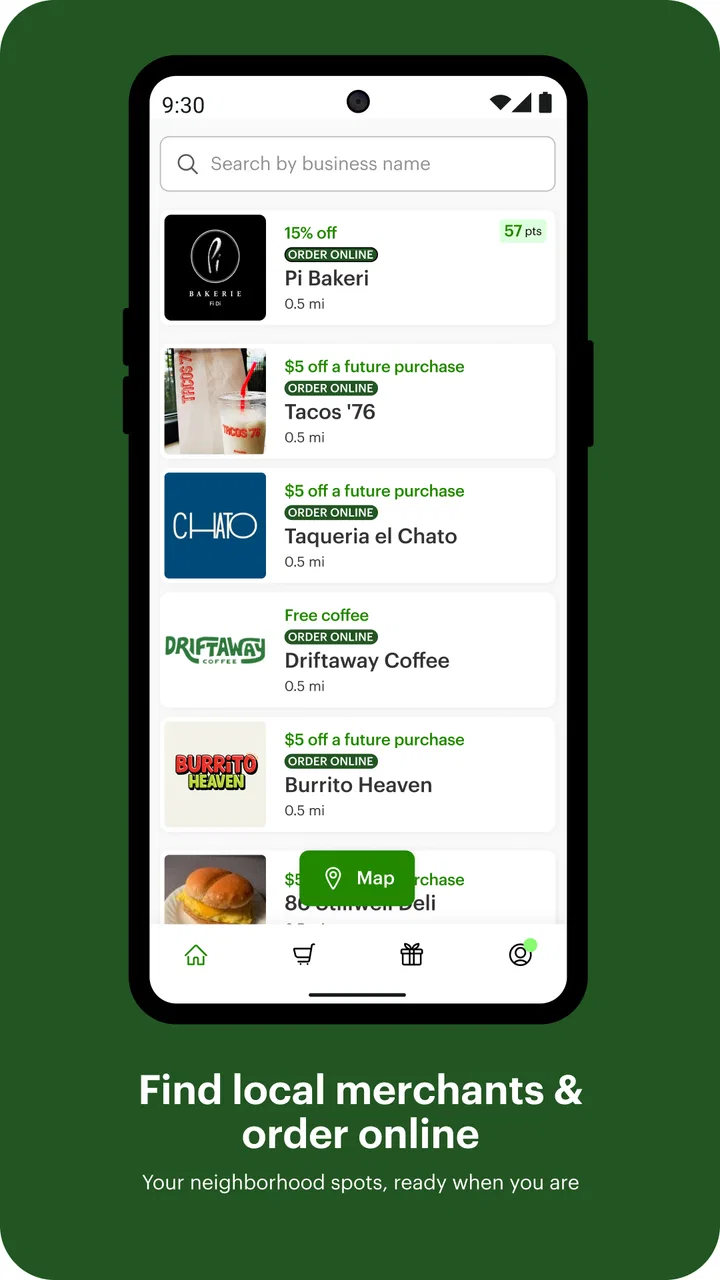
I found Clover: Perks and Order Ahead most useful when I treated it as a practical companion for local shopping rather than as a complete replacement for every loyalty card, ordering page, or payment method. It belongs to the lifestyle category, is free to use, and comes from Clover Network, Inc. The basic idea is simple: connect with participating local businesses, look for available loyalty benefits, and place an order ahead when that option is offered.
That sounds straightforward, but the quality of the experience depends heavily on the moment when you use it. With a reliable connection and a business that is properly set up in Clover, the app can reduce small bits of friction. When the network is slow, the business has limited digital ordering, or you are expecting one universal rewards wallet, the experience becomes less predictable. My overall impression is positive, but it is strongest for people who already visit local businesses that use Clover.
How Clover feels when your connection is doing the work
The app’s most important relationship is with connectivity. Browsing a nearby business, checking whether perks are available, and preparing an order all depend on current information being available at the right time. I would not open it expecting the same certainty as a saved note containing a loyalty number or a screenshot of an old menu. The useful information is tied to the business and the current ordering experience, so a stable mobile connection matters.
You May Also Like

 Blood Strike: 2.5 Anniversary
Blood Strike’s Loadouts Turn Every Drop Into a Tactical Gamble
A close look at Blood Strike’s custom loadouts: how fast access to signature weapons reshapes its battle royale rhythm, rewards preparation, and narrows the gap between fights.

 Pandora - Music & Podcasts
Pandora’s Music Is Easy to Start, but Harder to Recover
Pandora’s strength is its low-effort path from a seed to a station. Its weak spot is how much confidence it asks you to place in connection, setup, and quiet recovery.

 8 Ball Pool
 Is Built on Rivalries, Rematches, and Routine
A close look at the rivalries, rematches, shared routines, and unanswered safety questions that turn a quick pool match into a persistent mobile community.

 Samsung Music
’s Quiet Strength Is Playing What You Already Own
Its reach comes less from spectacle than from dependable access to a personal library. That simplicity is both the app’s strongest retention engine and its ceiling.

 AccuWeather: Weather Radar
AccuWeather Review: A Quick, Clear Forecast for Everyday Decisions
For everyday plans, the best forecast is the one you can understand quickly. AccuWeather makes rain timing, radar, and local conditions easy to act on, with a few trade-offs.

 Hill Climb Racing
Why Hill Climb Racing Still Turns Crashes Into One More Run
A tiny car, a bumpy hill and one more upgrade: Hill Climb Racing keeps resurfacing because its simple chaos makes every near-miss feel personal.
More From Our News Desk



This becomes especially noticeable when you are standing outside a café, restaurant, or other local business and trying to decide whether ordering ahead will actually save time. If the business appears and its ordering flow loads normally, Clover can turn an unplanned stop into a more organized visit. You can review the available choices before reaching the counter and, where ordering ahead is supported, avoid spending the entire wait deciding what to get.
There is a trade-off here. The app is more convenient than searching for a business separately, opening its own website, finding the correct menu, and then looking for a rewards process. However, it is not magic. Clover can only make the digital part easier when the relevant business has made that experience available through the platform. A local shop that accepts Clover for transactions may not offer every loyalty or advance-order feature in the same way.
I also found that the best time to use it is before you are already in a rush. Opening the app while walking quickly toward a pickup point, with one hand occupied and a weak signal, is a poor test of any ordering tool. A better habit is to check the business a few minutes earlier, review the order carefully, and then proceed once the app has loaded the information you need.
What the app changes during an ordinary outing
Imagine leaving work and deciding to stop at a familiar local business. Instead of searching through old messages for a rewards card or asking at the counter whether a loyalty benefit exists, you can check Clover first. If the business supports the relevant function, the app gives you a more direct route from discovery to order. That is a modest improvement, but small reductions in repeated effort are exactly where this kind of lifestyle app earns its place.
The useful detail is not simply that you can order. It is that the app can bring the loyalty and ordering parts of the visit closer together. I would still check the order summary before committing, especially if I had changed an item or selected a different option from my usual choice. Speed is valuable only when it does not create a second task at pickup.
For a regular customer, this can become a repeatable routine: open the app before leaving, find the business, inspect the available perks, place the order if the timing works, and keep the confirmation or order state visible until the visit is complete. That workflow is more dependable than assuming every participating business behaves identically.
Using it on the move without creating extra hassle
Clover is naturally suited to mobile situations, but mobile convenience has limits. The screen is smaller than a desktop ordering page, and people often use it while carrying bags, walking, or standing in a queue. I recommend slowing down for the final review instead of tapping through the process as quickly as possible. A few seconds spent checking the business, items, and selected options can prevent an awkward correction later.
The app is also more useful when you have a clear destination than when you are casually browsing for something to do. If you already know the local business you want, the path is focused. If you are hoping Clover will act as a broad guide to every nearby option, your results may feel less satisfying because the experience is shaped by participating businesses and their available setup.
Another practical point is battery and screen attention. An ordering app is not usually something I want open continuously during a day out. I would use it for the specific task, complete the order or perks check, and close it rather than leaving it active while moving between places. That keeps the app in its proper role: a tool for a particular visit, not a constant background companion.
When an order or perk does not go smoothly
The most important recovery skill is not assuming that a slow screen means the action failed. If the connection pauses after you submit something, repeating the action immediately can create uncertainty. I prefer to wait, check whether the order state has updated, and look for a clear confirmation before trying again. If the app remains unclear, asking the business directly is often faster than tapping repeatedly.
This matters because the app sits between your phone and a real local business. A technical delay can affect a real pickup expectation, while a misunderstood perk can lead to an uncomfortable conversation at the counter. Clover helps organize the digital side, but the business remains part of the final experience. I would keep the phone available until I know the order or benefit has been recognized.
For a failed connection, the sensible fallback is simple: return to the business’s normal process. That might mean ordering in person or asking staff about the loyalty option. I would not rely on Clover as the only way to complete an urgent purchase. It is a convenience layer, not a guarantee that every visit can be handled digitally under every network condition.
There is also a human recovery step that generic app reviews often overlook. If you are collecting an order, make sure you can explain what you selected and when you placed it. If the business cannot immediately see the same status, a calm description is more useful than showing a screen with no clear result. The app can reduce confusion when it is working, but good communication still matters when the connection breaks down.
Keeping mobile data use sensible
I would not describe Clover as an app that needs constant attention. For data-conscious users, the practical approach is to open it only when planning a specific local visit, load the relevant business information, and avoid repeatedly refreshing the same screen. There is little advantage in checking a business over and over while you are still deciding whether to go.
Using a trusted Wi-Fi connection before leaving can make the planning stage more comfortable, particularly if you want to review the order without standing outside with an unreliable signal. Once you are ready to travel, the app can then be used for the short part of the process that actually needs to happen on the move. I see this as a workflow improvement rather than a promise about offline behavior; the ordering experience still depends on current connectivity when you need live information.
Privacy-minded users should also apply the same judgment they use with any local-commerce app. Install it because you expect to use its business and ordering functions, not merely because a shop happens to mention it once. Check the app’s current device prompts and account choices during setup, and avoid granting attention or access that does not feel necessary for your intended use. The age rating is Mature 17+, so younger users and families should take that store classification into account before installing it.
Who gets the most value from Clover
I think the best audience is someone who returns to local businesses and wants fewer repeated steps. If you frequently visit participating cafés, restaurants, or other merchants, the combination of perks and order-ahead access can be more useful than keeping separate bookmarks and loyalty routines for every place. The benefit grows through repetition: the more often the same local businesses fit your routine, the more worthwhile it is to check Clover before each visit.
It is also a good match for people who dislike waiting in line but still want to support local businesses. Ordering ahead can make a busy stop feel more planned, while loyalty perks give you another reason to keep returning to the same merchants. I would recommend it to a friend who has already noticed Clover at places they visit, because that is a stronger reason to install it than curiosity alone.
The app is less compelling for someone who rarely shops locally, prefers a single large marketplace, or wants every rewards program collected in one universal account. It may also disappoint users who expect every Clover-connected business to offer identical features. The local-business model is both its point of difference and its limitation: it can be convenient in the right neighborhood, but its usefulness is not equally distributed everywhere.
How it compares with the usual alternatives
The usual alternative is to use each business’s own app or website. That can be better when you are loyal to one chain and want its complete rewards history, offers, and ordering tools in one dedicated place. Clover has an advantage when your routine includes several local businesses that use the platform, because you do not have to learn a completely different process for each one.
Another alternative is ordering in person and carrying physical loyalty cards. That remains the safer choice when your connection is unreliable or when you need immediate help from staff. It is also more universal: you can explain what you want without depending on a digital menu. The cost is time, and you may lose the convenience of preparing an order before arriving.
Compared with a general delivery marketplace, Clover feels closer to the direct local-business visit. I would choose it when I plan to collect an order myself and want to interact with a familiar merchant. A delivery marketplace may be better when I need delivery discovery across many restaurants, but it can add layers that are unnecessary for a simple pickup. The right choice depends on whether the priority is local loyalty, broad discovery, delivery, or the fastest in-person transaction.
What stood out after regular use
One non-obvious strength is that Clover encourages me to decide the purpose of a visit before I arrive. I can separate browsing from ordering: first identify the business and available option, then complete the purchase only when the timing makes sense. That reduces the temptation to place an order simply because the process is easy.
A second insight is that connectivity should be treated as part of the ordering plan, not as an invisible technical detail. Checking the app before leaving gives me time to recover if the business page or order flow is slow. This is particularly useful when a pickup has a deadline. The app works best when I build a small buffer around it rather than expecting instant results at the busiest moment.
A third trade-off is that digital convenience can make loyalty feel fragmented rather than simpler. Clover may bring certain local-business interactions together, but it does not remove the need to understand which business supports which function. I would keep my expectations specific: use the app to check the available experience for the place I am visiting, not to assume that every merchant offers the same perks or ordering path.
The current version is 6.1.5, and the app requires Android 8.0 or later. That makes device compatibility worth checking before planning around it, especially if you use an older phone. On supported devices, the free price makes trying it low-risk, but the real value still depends on whether the businesses in your routine participate in the features you want.
My connectivity verdict
Clover: Perks and Order Ahead is a useful lifestyle app when it matches your local routine. Its strongest moment is a planned visit to a participating business: I can check for a loyalty benefit, prepare an order, and arrive with a clearer idea of what should happen next. Its weakest moment is an urgent transaction on a poor connection, when the app cannot replace the certainty of speaking directly to the business.
The app has built a substantial audience, with over a million installs, an average rating of 4.1, and roughly twenty-four thousand ratings. Those figures suggest that the concept is working for many people, while also leaving room for the individual experience to vary by business and situation. I would not install it expecting a universal rewards system, but I would happily keep it if the local places I visit use it regularly.
My recommendation is straightforward: try it if you want to combine local perks and advance ordering in one mobile workflow, and test it first with a business you already know. Use a stable connection for planning, verify the final order before leaving, and keep an in-person fallback for time-sensitive visits. The app is most valuable when it removes a small, repeated inconvenience without becoming the only thing your visit depends on.
FAQs for Clover: Perks and Order Ahead
01What is Clover: Perks and Order Ahead used for?
Clover: Perks and Order Ahead is a customer-focused app for discovering participating restaurants and businesses, browsing menus or product selections, placing orders in advance, and managing loyalty rewards. Depending on the merchant, you may be able to customize an order, choose pickup options, view previous purchases, and collect perks or points. Available features can vary considerably between locations and participating businesses.
02Can I use Clover to order from any restaurant or store?
No. Clover does not provide ordering access to every restaurant or retailer in your area. The app works with businesses that use compatible Clover services and have enabled customer ordering or loyalty features. After entering your location, you will see the participating merchants available nearby. If a favorite business does not appear, it may not support Clover ordering, may be temporarily unavailable, or may use a different ordering platform.
03How do Clover perks and loyalty rewards work?
Perks are controlled by each participating business, so the rules are not identical everywhere. A merchant may offer points, digital stamps, discounts, free items, or other rewards after qualifying purchases. The app can help display your progress and available benefits, but you should review the individual program terms, including expiration dates, minimum purchase requirements, and redemption restrictions. Rewards may only be valid at the business that issued them.
04Is payment through Clover: Perks and Order Ahead secure?
The app is designed to support payments for participating merchants, but the exact payment methods and checkout experience depend on the business. Before confirming an order, review the selected items, taxes, fees, tip, pickup details, and final total carefully. Use the official version of the app, keep your device updated, and avoid sharing account or payment information through unofficial messages. Contact the merchant directly if a payment or refund appears incorrect.
05Can I cancel or change an order placed in the app?
Changes and cancellations are not guaranteed because orders may be sent directly to the merchant for immediate preparation. If you need to modify an order, check the app for available options and contact the business as soon as possible, preferably by phone. Refunds, missed pickup requests, substitutions, and incorrect items are generally handled according to the individual merchant’s policies rather than one universal Clover policy.
Pros
- Earn rewards and discounts at participating restaurants and stores.
- Order ahead to save time during busy periods.
- Easy access to digital receipts and transaction history.
- Supports contactless payments at compatible Clover terminals.
- Useful for tracking available perks in one convenient app.
Cons
- Benefits depend heavily on participating Clover merchants.
- Some offers may have location or redemption restrictions.
- Order-ahead availability varies by restaurant and region.
- Requires account and payment information to use key features.
- App usefulness is limited where Clover services are uncommon.

Clover: Perks and Order Ahead
Gallery